Your crowd picks the next song.
Take paid requests, let the room boost favorites, sell merch and moments, and bring the same page to your stream. One QR code. You stay in control of the set.
Free to claim. No setup call. No app for your guests to download.
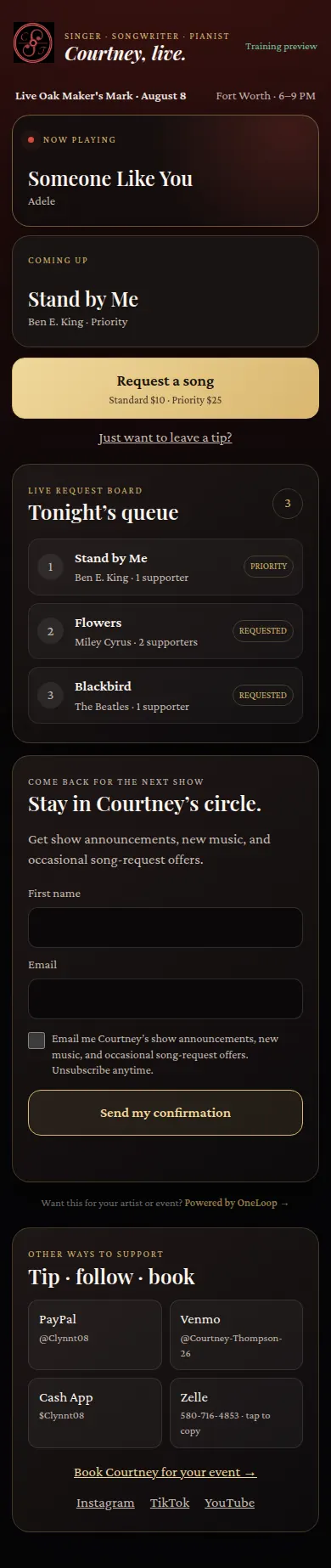
Scan, request, perform, reconnect.
Guests use their phones. The performer runs the room from theirs. Nothing to install on either side.
Scan
Guests scan one QR code on the table, the stage or the stream and land on your live page.
Request
They pick from tonight's approved songs, add a short dedication, and anyone can boost a song to move it up.
Perform
The highest supported total is Up Next. Ties go first come, first served. You still decide what gets played.
Reconnect
Guests who choose to join your list hear about the next show. Joining is always a separate, unchecked opt-in.
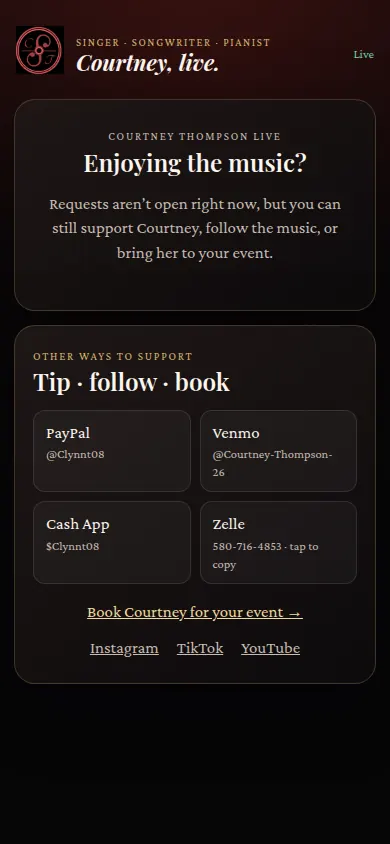
The screens your guests and you actually use.
From a performer page in a real room. These screens show sample activity, not customer data.
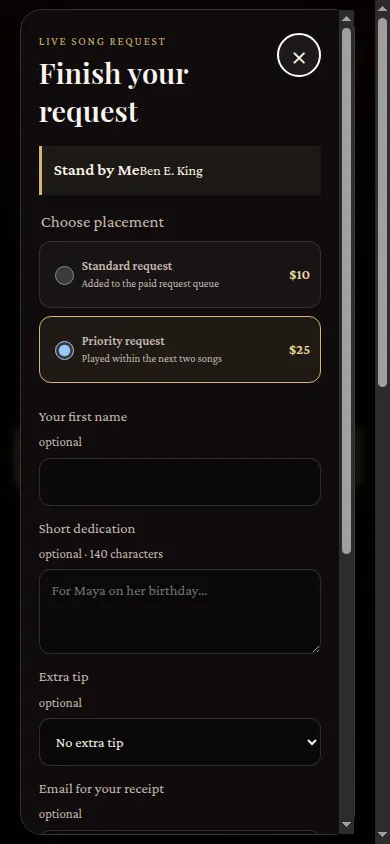


Everything the room wants, on one page.
Paid requests and boosts
Sell only the songs you enabled for that night. Boosts persist, so nobody loses a bid. Duplicate requests become supporter counts.
Merch and moments
Pickup merch at the show, shipped merch, or live moments like "wear the cat ears for three songs", with performer-controlled fulfillment.
Stream-ready
One permanent browser-source URL for OBS or Streamlabs. Queue, alerts, QR and ticker update on their own.
One QR for everything
Download your QR code and print table tents. One scan opens requests, tips and merch together.
Keep your tip links
Venmo, Cash App, PayPal and Zelle stay as they are. That money goes straight to you and never touches OneLoop.
Know your night
Gross, net, requests, boosts and item sales per show and lifetime, with traffic split by room, stream and direct.
Free to start. You keep most of every sale.
No monthly fee to claim your page. OneLoop only earns when the room spends through your page.
To claim your page
Sign up, pick your Live handle and start with tips only if you like.
Of OneLoop checkout sales
Paid requests, boosts and merch sold through your page. Payouts go to your connected Stripe account.
Of external tips
Your Venmo, Cash App, PayPal and Zelle links. OneLoop takes nothing and never sees that money.
Payment rule: only a verified checkout adds or moves a song in the queue. A direct tip is a tip. It never jumps the line.
A human performance, not a vending machine.
You choose the catalog, open or pause sales, reorder standard requests, moderate dedications and issue refunds.
- Pause requests instantly for a break or a room that needs a different direction
- Priority requests show their deadline and warn you before a promise is missed
- Refunds go through an explicit path, never a silently dropped order
- Large, venue-ready controls on your phone
Built for live rooms
Residencies, private events, lounges, restaurants, house concerts, livestreams and showcases.
Performing this week?
Claim your page now and have a QR code ready before soundcheck.
Questions people ask
Do my guests need an app or an account?
No. They scan a QR code and use the page in their phone's browser.
Can guests force the setlist?
No. You control the catalog, the queue and whether sales are open. Boosts move a song up, and you still decide what gets played.
How do payments and refunds work?
Paid requests go through secure hosted checkout and only enter the queue after the payment is confirmed. Your console keeps a ledger of paid, fulfilled, rejected and refunded requests. You need a connected Stripe account to take paid requests.
Does paying put someone on my email list?
No. Joining your list is separate, optional, unchecked by default and confirmed by email.
Does OneLoop handle music licensing?
No. Artists and venues stay responsible for performance and venue licensing.
Is everything available today?
Requests, boosts, tips, merch, the stream overlay and your page are live now. Paid requests need a connected Stripe payee, and some features are rolling out in stages. Tell us about your room below and we'll help you get set up.
Bring OneLoop Live to your room.
Running several performers, a residency or a series? Tell us how your nights run and we'll reach out within one business day.